
- 01
Choose the checks
Administrators choose which registries and screening sources apply in Settings, Registry Checks. Different supplier categories can need different checks.
- Supplier categorySet by an administrator
- Company registryApplies
- LEI registerApplies
- Sanctions screeningApplies
- Each supplier category gets the checks it needs
- 02
Checks run on submission
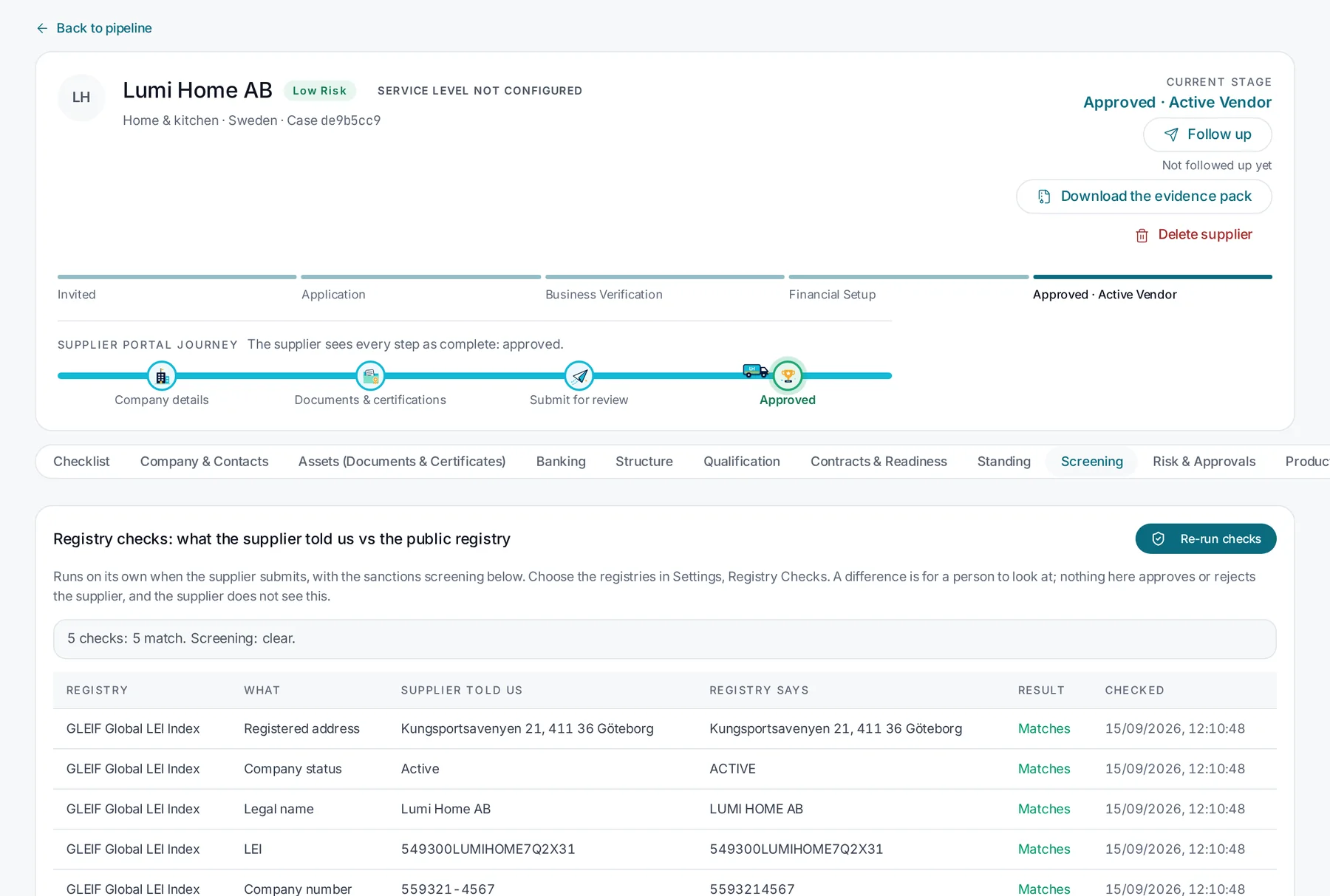
When the supplier submits, Skuvet compares the details provided, such as legal name, registered address, company status, LEI and company number, with what the registry holds.
- 03
Differences go to a person
A difference is for a person to look at. Nothing in the checks approves or rejects the supplier, and the supplier does not see the internal results.
- 04
Evidence is kept
Each result is stored with the time it was checked. An evidence pack can be downloaded per supplier for audit or internal review.
- Check resultsWhat was compared
- Time of each checkRecorded automatically
- Supplier documentsAs submitted
- Evidence packOne download per supplier
- Ready for audit or internal review
- 05
Checks can be re-run
Checks can be re-run on demand, for example when information changes or before a contract renewal.
Supplier verification
Compare what a supplier tells you with the public record.
Registry checks and sanctions screening run when a supplier submits. Differences are put in front of a person. Evidence is kept for every check.
The problem
Manual verification is slow, inconsistent and hard to prove.
Verifying a supplier by hand means copying a company number into a registry website, checking a VAT number, searching a sanctions list and saving screenshots. Each reviewer does it slightly differently.
When an auditor or a fraud investigation asks what was checked and when, the answer is incomplete. And a change to bank details months later often goes through without the same scrutiny.

How it works
Supplier verification in Skuvet, step by step.
Capabilities
What is included, and what depends on your setup.
We separate what is available in the product from what is configured for each customer and what needs integration with your systems.
AvailableConfigurableRequires integration
Registry comparisonAvailable
Supplier-provided details compared field by field with registry data, including the GLEIF LEI index.
Sanctions and watchlist screeningAvailable
Screening runs alongside registry checks on submission.
Choice of registriesConfigurable
Select which registries apply in Settings. Coverage depends on the registries enabled for your account.
Evidence pack per supplierAvailable
A downloadable record of what was checked, when and with what result.
Re-run checksAvailable
Run the checks again from the supplier record.
Third-party risk platform hand-offRequires integration
Pass verification results to an existing risk platform.
Registries and screening sources available to an account should be confirmed during evaluation. Skuvet records verification evidence; the decision to approve a supplier remains with your team.
Who uses it
Clear responsibilities for everyone involved.
ComplianceDefines which checks apply and reviews differences.
ProcurementSees verification status as part of the onboarding record.
FinanceRelies on verified details before payment set-up.
Internal auditUses evidence packs to confirm what was done.
Continue exploring
Related capabilities.
 PlatformSupplier & vendor onboarding
 PlatformGovernance & approvals
 PlatformIntelligent workflows
Experience Skuvet
See how Skuvet would work for your business.
Tell us about your suppliers, documents and systems. We will tailor the demonstration to your process.